
Last week, we released a few new features for Mink, Språkbanken's data platform!
With mink-frontend 1.15.0 and mink-backend 2.1.0, we have added multi-player support and granular analysis selection, and you can now use audio as well as CoNLL-U as sources. Read on to understand more about these new abilities.
Sharing
You can now share a Mink corpus with your team mates. You can choose whether they should be able to edit and process the corpus (WRITE), or just inspect it and explore the result (READ).
- Log into Mink and create or select a corpus
- Find the new Sharing panel on the corpus overview page
- Click the Manage access button to open the resource in the SB Auth authentication tool
- Click Add user and enter the email of the person you want to invite, as well as the access level you want to grant them
- Click Send invite to create the invitation. However, we cannot currently send automated emails, so the resulting page will show you a generated invitation URL that you are asked to copy and send youself (in private!)
- The recipient can visit the URL to activate the invitation and then find the shared resource in Mink
Note that the READ permission is enough to view the corpus also in Korp or Strix if you install it there.

Individual analyses
In the corpus configuration, you can choose which analyses Mink should apply when processing the corpus. You could previously only select from a few pre-defined groupings of annotations: Morphology, Readability, etc. Now, you can instead select and deselect specific analyses.
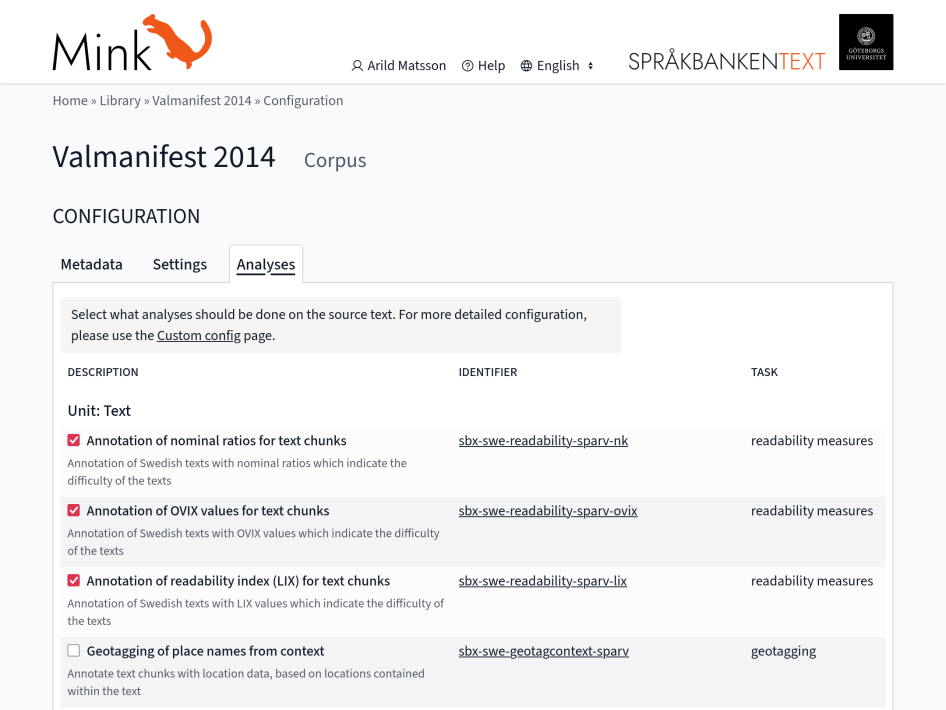
If you are unsure about what to select, just select all of them. Or all except the slowest ones, Geotagging and Named entity recognition, which are deselected by default.
Analysis or annotation? In our terminology, an analysis is a programmed functionality that processes the corpus data in some way – typically by reading the text and perhaps some annotations, to produce new annotations and add them to the result.
Audio source
Utilizing the KB-Whisper model, Mink now accepts audio files as corpus sources. When processing an audio corpus, the Whisper model is first applied to generate a text transcription, and then further analysis is performed on that text.
The Sparv plugin used for this is sbx-swe-speech2text-transformers-kb_whisper_wav (or mp3 or ogg)
To see the generated plain-text representation in Mink, make sure you have first run the annotation processing, and then click the filename in the Source files panel.

CoNLL-U source
The CoNLL-U file format, used primarily in the Universal Dependencies project, has one token per line and morphosyntactic attributes in columns. A new importer plugin sbx-mul-import-sparv-conllu allows us to use CoNLL-U files as source for Mink corpora.
Note that some of the analyses available in Mink produce annotations similar to those that can be present in CoNLL-U source files. See the Configuration section in the plugin README.